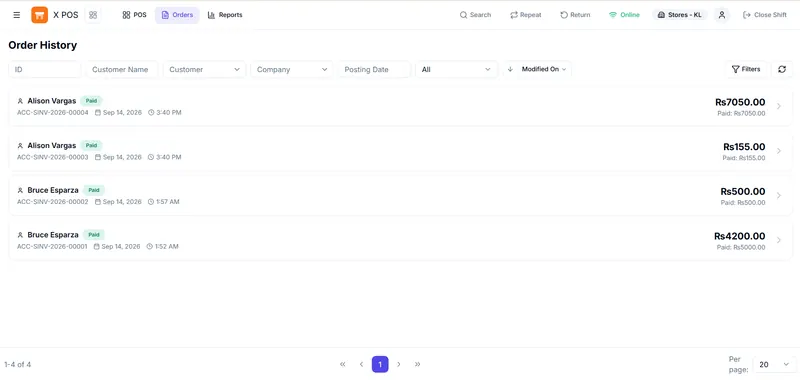
X POS for ERPNext
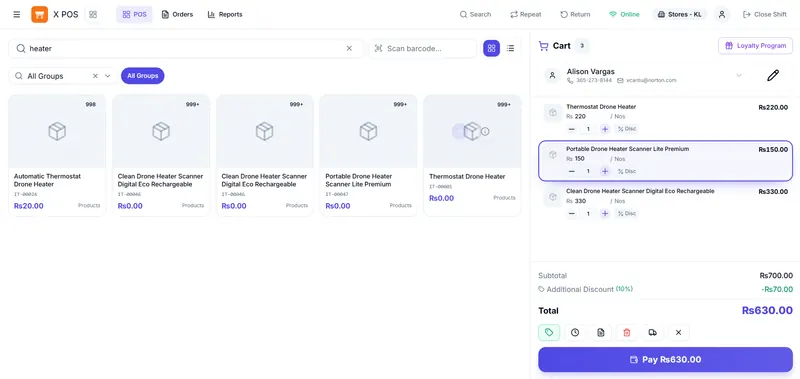
An open-source point of sale that runs on your ERPNext site. Checkout keeps working offline and syncs in the background, with barcode scanning, split payments, returns and shift reconciliation.
For retail, distribution, manufacturing and service businesses
We implement and customise ERPNext, build Frappe apps and point-of-sale systems, and connect your devices and payments so your team stops re-keying data between systems.
Spreadsheets and re-keying between systems
Processes ERPNext doesn't cover out of the box
Checkout that stalls when the internet drops
Devices and services that don't talk to your ERP
Repetitive back-office tasks
Two point-of-sale products and a set of open-source Frappe apps whose code you can read before you hire us.
An open-source point of sale that runs on your ERPNext site. Checkout keeps working offline and syncs in the background, with barcode scanning, split payments, returns and shift reconciliation.

A desktop app for shops that need to keep trading without the internet: inventory, double-entry accounts and a point of sale, with tills sharing one hub on the local network.
Four kinds of work make up most of our projects. Each starts from a problem in how your business runs today.
Stock, sales and accounts spread across spreadsheets and tools that disagree.
A process standard ERPNext doesn't model, or a screen that's too slow for the job.
Tills that stop when the internet does, or sales that don't match your stock.
Data typed from one system into another, and approvals chased by hand.
We also build web and mobile apps and the cloud infrastructure behind them, usually alongside an ERPNext or Frappe project. Web, mobile and cloud work
Four stages, each ending with something you can review before we move on.
We look at your processes, current system and data, and agree what a good result looks like.
You get: a written scope and estimate
Workflows, data structure and screens are agreed before building starts.
You get: a specification or prototype to sign off
We work in short increments with regular demos, and migrate and check your data.
You get: a working system on a test site
Go-live, user training, then ongoing support and improvements if you want them.
You get: a live system and handover notes
X POS and our other Frappe and ERPNext apps are public on GitHub under the MIT licence, so you can see how we structure and document our work.
We design, release and maintain X POS and Minu ourselves, so we work through the same retail and stock problems our clients bring to us.
Customisations go into separate Frappe apps, the same way our own apps are built, rather than edits to ERPNext's core code.
Scope, demos and questions go directly between you and the people writing the code.
Share what you use now and where it causes trouble. We reply within one business day with questions or a suggested next step.