 X POS
X POS
An offline-capable point of sale for ERPNext
X POS is a fast, keyboard-driven point of sale built on Frappe and ERPNext. Checkout keeps working without internet and syncs as soon as you're back online. Use it in the browser or install it as a web app.
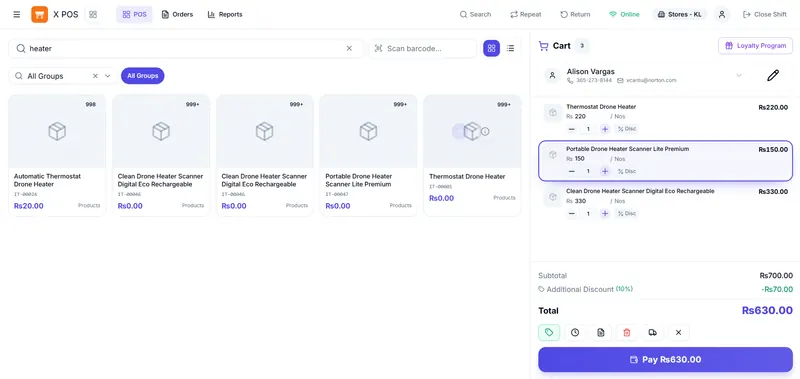
X POS at a glance
Deployment
Web app and installable PWA today; desktop app in development
Offline
Sales queue locally and sync on reconnect
Customers offline
Up to 1,000 cached for search
Permissions
26 settings per POS profile, from credit sales to settlement
Keyboard
Ctrl+K command palette and shortcuts
Sign in, your way
A dedicated login built for cashiers, separate from the Frappe desk, that gets a shift started in seconds and stays out of the way after that.
- Dedicated /xpos/login screen with show/hide password
- Active Frappe sessions are detected automatically, no re-entering credentials
- Self-service password reset via Frappe's built-in email flow
- Redirects straight back to the page you were trying to reach
Sell anywhere
Full POS operation with no internet connection, then a background sync the moment you're back online. Deploy on the web, install as a PWA, or run the Electron desktop app for networked stores.
- Offline-first checkout with auto background sync on reconnect
- Installable PWA with service-worker caching
- Desktop app for Windows, macOS and Linux In development
Find anything in seconds
Card or list browsing, instant search and barcode scanning, all tuned so a cashier never has to hunt for an item mid-queue.
- Card or list view with live stock, price & image, loading as you scroll
- Instant search by name, code, barcode, serial or batch number
- Hierarchical item-group pill filters, plus batch/serial/UOM pickers
- F2 barcode scanning with green/red flash feedback straight into the cart
Run the till
A real-time cart with line-level discounts, split payments across cash, card and mobile wallets, and every checkout edge case cashiers actually hit.
- Real-time cart, line discounts & barcode scanning
- Split payments across cash, card, mobile wallet & custom modes
- Draft & hold multiple open orders per session
- Returns with automatic credit notes, plus one-tap repeat sales
Know your customers
Search, create and manage customers without leaving the till, with balances, credit and loyalty status right where the cashier needs them.
- Search by name, mobile, email or tax ID, or create a customer inline
- Outstanding balance, stored credit & loyalty status shown on the cart
- Customer-specific price lists & discounts applied automatically
- Up to 1,000 customers cached for offline search, synced back online
Manage cash & shifts
Open and close shifts with a full denomination breakdown, track till expenses and deposits as proper journal entries, and let cashiers settle bills at a separate till.
- Opening & closing shift reconciliation across all payment modes
- Cash expenses & deposits posted as Journal Entries
- Cashier settlement, bill at the counter, pay at a separate till
- Open tabs & credit sales you can recall later
Every sale, on record
A complete order history with powerful filters and a full audit trail, so any transaction is a search away.
- Filter by date range, status, return and customer, with advanced operators
- Drill into line items, tax breakdown, payments & loyalty activity per order
- Reprint or start a return directly from the order detail view
- Sort by date, name or amount to find what you're looking for fast
Stay stocked
Real-time stock per warehouse, batch and serial tracking down to the receipt, and the full purchase order to invoice workflow, all without leaving the POS.
- Real-time stock levels per warehouse
- Batch & serial number selection at sale or return
- Purchase orders, purchase invoices & stock receiving with variance handling
- Product bundles sold as a single line item
- Weighing-scale barcode parsing for grocery, produce & butcher counters
Tax done right
A tax engine that handles multi-account templates, per-item overrides and tax-inclusive pricing, so every receipt reconciles cleanly.
- Multi-account tax templates, net-total or fixed charge types, tax-inclusive supported
- Per-item tax templates override profile defaults via the item-group hierarchy
- Real-time calculation as the cart changes, with a full breakdown on shift close
- Zero-rated items & mixed tax rates in the same cart, calculated correctly
Grow revenue
Reward repeat customers, run automatic promotions and give staff the pricing tools to close the sale, all enforced consistently at checkout.
- Loyalty programs with point accumulation & redemption
- Pricing rules by volume, customer, time or brand
- "Buy X get Y" promotions, coupon & gift-card codes
- Referral program & dynamic delivery charges
Configure every profile
The POS Profile is the control hub for every till, display, pricing, payments, cash movement and purchasing, plus who's allowed to do what.
- One profile controls display, pricing, payments, cash movement & purchasing per till
- 26+ granular permission flags, from credit sales to cashier settlement, per user
- Warehouse, price list, customer group & sales-person restrictions enforced automatically
- Role-gated features like recalling other shifts' tabs or settling outstanding invoices
Print anything, tender any currency
Multi-currency tender and thermal receipt printing with barcodes and QR codes, tuned for retail counters that need to move fast.
- Multi-currency, including mixed-currency cash tender
- 80mm thermal (ESC/POS) receipts with barcode & QR printing
- Conditional print formats — different receipts for returns, item groups or high-value sales
- Custom Jinja/HTML print formats with built-in barcode & QR helpers
Small details cashiers feel every day
Command palette
Ctrl+K and keyboard shortcuts to navigate, search items and calculate without touching the mouse.
Dark mode and right-to-left layouts
Follows the system theme with a manual toggle, and supports right-to-left languages such as Arabic.
Touch-friendly
Large touch targets and a layout that adapts across phones, tablets and desktop screens.
Run it the way your stores work
Every option talks to the same Frappe and ERPNext site, so pricing, stock and customers stay in sync however a till connects.
Web
Runs in the browser straight from your Frappe site. Nothing to install.
Available
Installable web app
Install from the browser on any device, with service-worker caching for offline use.
Available
Desktop
A standalone Electron app for Windows, macOS and Linux with a local database and hardware access. A hub-and-spoke setup for multiple tills is planned.
In development
Built with Vue 3, TypeScript, Pinia, Tailwind CSS, Vite and the Frappe Framework. Need a standalone desktop system today? See Minu POS.
Want X POS running in your store?
Tell us how your stores operate today. We'll help with setup, data migration and configuration, or answer questions if you're running it yourself.